Difference between revisions of "Komodo New Project"
Jump to navigation
Jump to search
Templarian (talk | contribs) (how to create a new project) |
|||
| Line 1: | Line 1: | ||
| − | Creating a new project is pretty | + | Creating a new project is pretty straight forward in Komodo and the whole process is automated. |
'''Step 1.''' Click the Drop down on the far left of the webOS Tab ([[Image:Komodo_Page_White_Arrowdown.png]]). | '''Step 1.''' Click the Drop down on the far left of the webOS Tab ([[Image:Komodo_Page_White_Arrowdown.png]]). | ||
Latest revision as of 02:17, 17 September 2011
Creating a new project is pretty straight forward in Komodo and the whole process is automated.
Step 1. Click the Drop down on the far left of the webOS Tab ( ).
).
Step 2. Select New Project ( ).
).
Step 3. Select a Empty folder in which to place the project (Ex. "documents/projects/com.domain.myapp/")
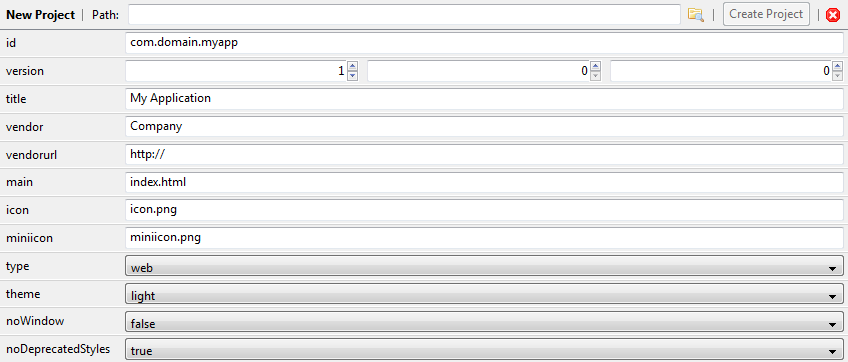
Step 4. Fill in the various data asked for. The defaults are probably what you want for everything below the "main" textbox.

New Project Screen Expanded (you will probably have a scroll bar)